The Guest Passes tab is the full record of who has access to a building; passes residents issued themselves and management keys you issued. It's where you audit active access and shut off a pass that's no longer needed.
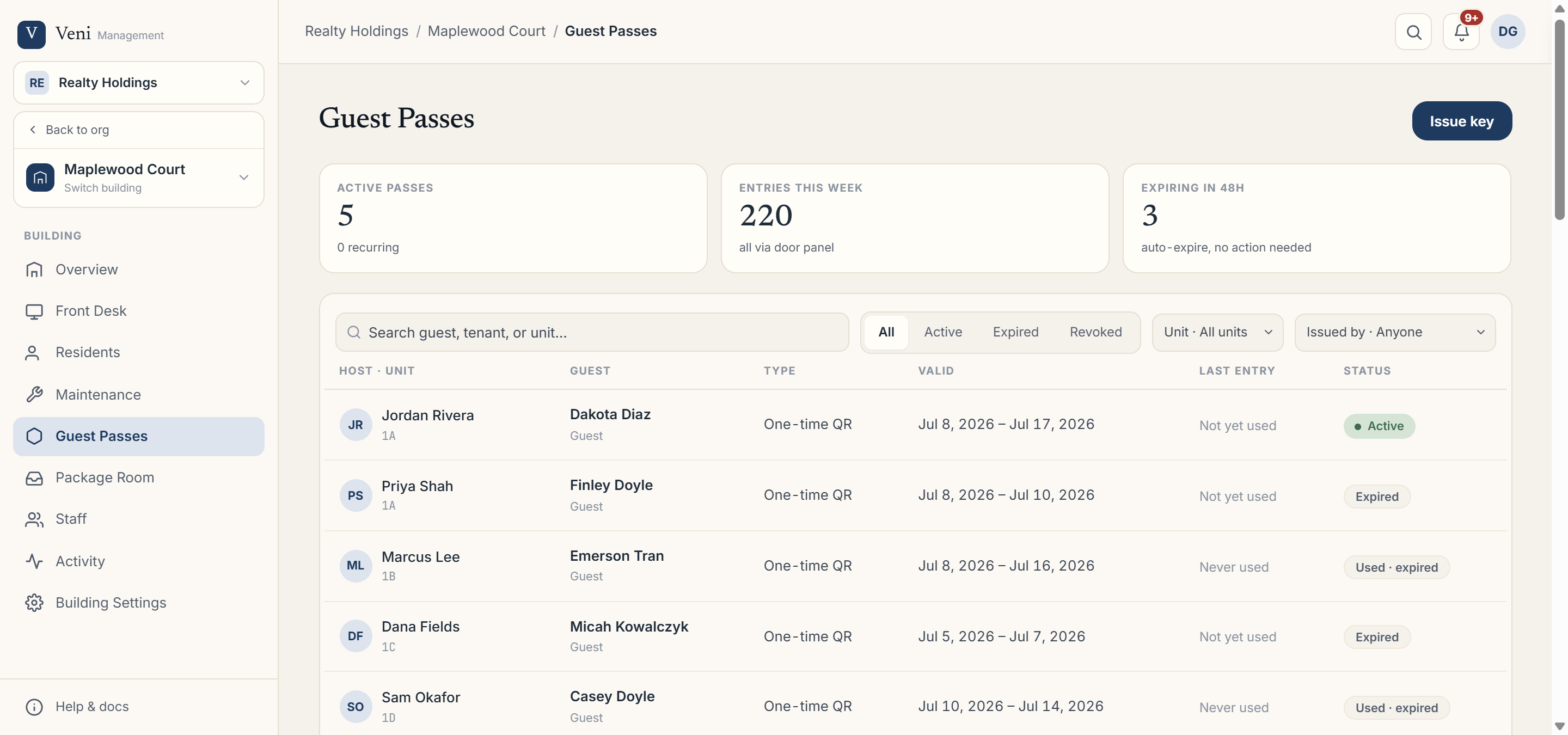 The Guest Passes table with status filters
Reading the table
Each row shows Host · Unit, the Guest, the pass Type (One-time QR, Recurring, Vendor visit, or a management/building key), how long it's Valid, the Last entry, and its Status. Filter the list by:
- Status: All, Active, Expired, or Revoked.
- Unit.
- Issued by: Anyone, Tenants, or Management.
The stat cards up top summarize Active passes, Entries this week, and Expiring in 48h (or, in ID-check buildings, documents on file and awaiting signature).
Expiry is automatic
You rarely need to clean anything up. A pass becomes Expired on its own once it passes its valid-until time or hits its maximum uses; no action needed.
Revoking a pass
To cut off access immediately, open the pass (click its row) and choose Revoke pass. It moves to Revoked and the code stops working right away.
More in Guest passes
- Issuing a guest pass and how QR redemption works2 min read
- Issuing a management key1 min read
- Vendor visits: compliance forms and ID at the desk1 min read
- Recurring and scheduled guest passes2 min read
- Setting up the vendor compliance form2 min read