← All guides
Residents issue their own guest passes from the Veni app. As a manager you can also issue access yourself (a management key) for a cleaning crew, an appliance repair, a broker's open house, or a recurring vendor. Open a building's Guest Passes tab and choose Issue key.
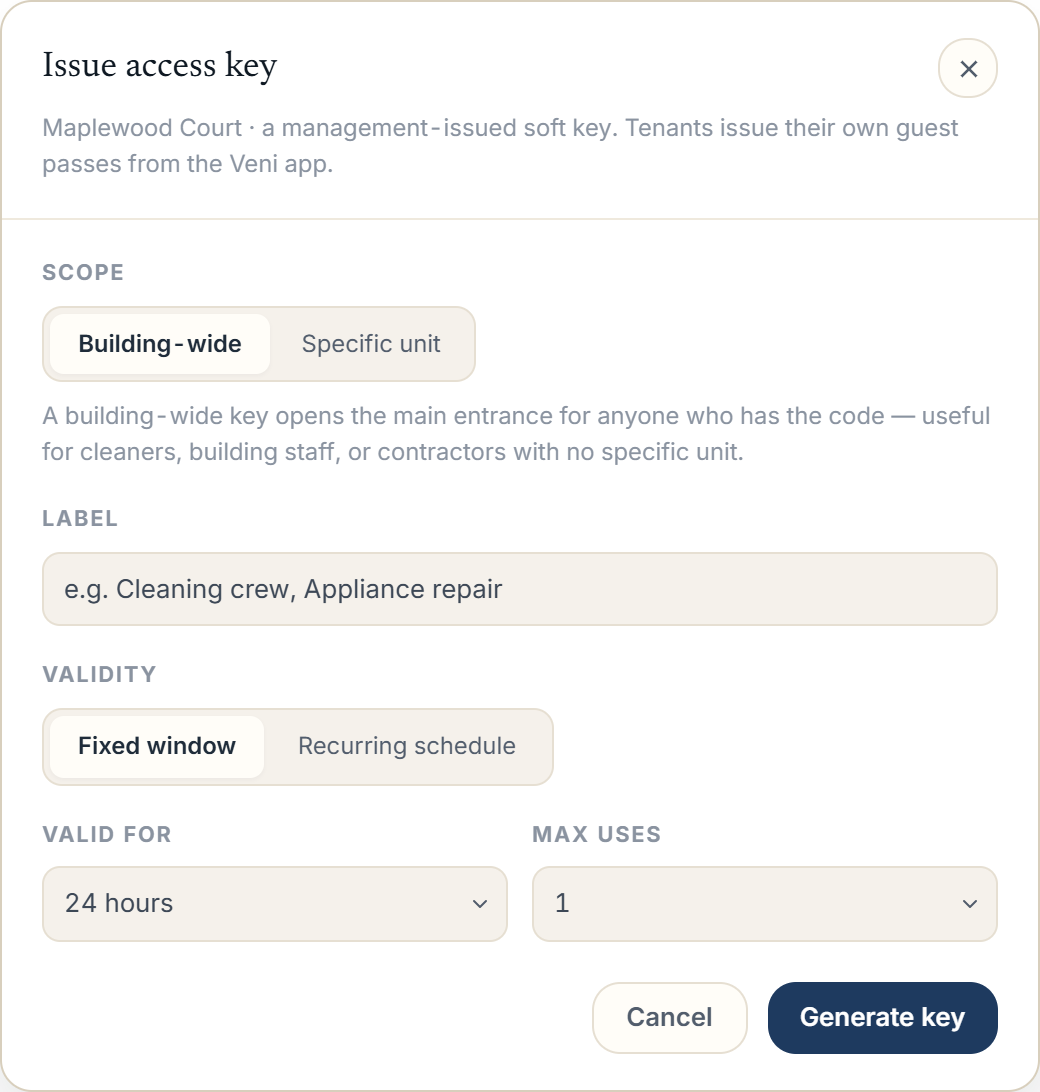 The Guest Passes tab with the Issue access key modal
Scope
Choose who the key lets in:
- Building-wide: for a vendor who needs the common entrance, not a specific apartment.
- Specific unit: tied to one unit.
Give it a Label you'll recognize later, like *Cleaning crew* or *Appliance repair*.
Validity
Pick how long the key works:
- Fixed window: set Valid for (24 hours, 48 hours, 7 days, or 30 days) and Max uses (Unlimited, 1, 5, or 10).
- Recurring schedule: choose the days of the week with the day pills and a From / Until time, for access that repeats: a weekly cleaner, say.
Sharing the key
Choose Generate key. Veni produces a QR code and a short alphanumeric code. The door accepts all three ways in: the QR, the code read aloud, or a printed decal. Share it with Copy link, Copy code, or Email to visitor.
Emailing a pass sends the link to the visitor but does not store their address. In front desk buildings, a management key is scanned at the desk rather than at a panel.
More in Guest passes