← All guides
Veni's maintenance is a dispatch system that connects a resident who reports a problem with the superintendent who fixes it, and keeps you in the loop the whole way. The building Maintenance tab is your view of every open job.
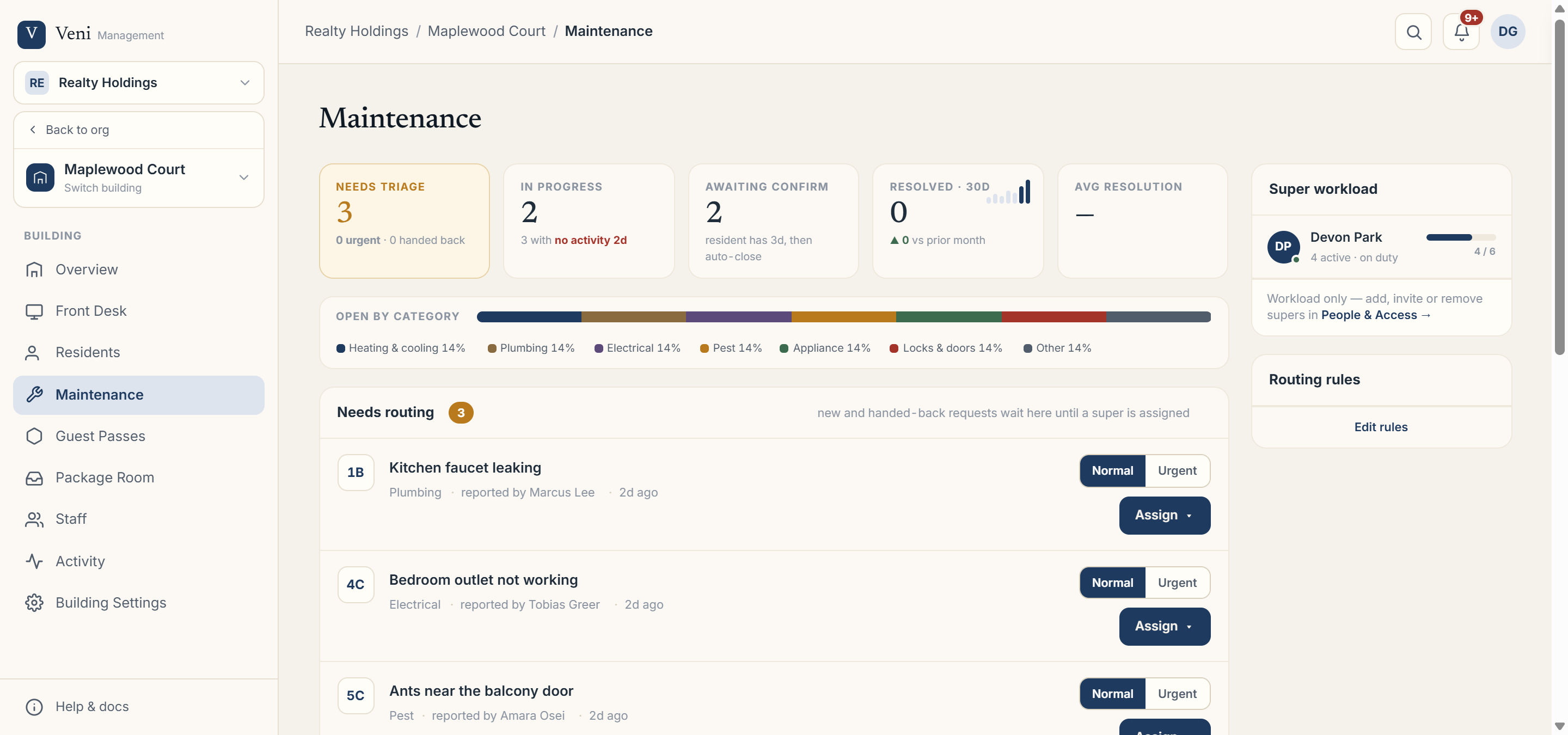 The Maintenance tab with status lanes
How a request starts
A resident reports an issue from the Veni app, guided by a short assistant that helps them describe the problem, pick a category (Plumbing, Heating & cooling, Electrical, Appliance, Pest, Locks & doors, or Other), set an urgency (low, normal, or urgent), and attach photos.
The lifecycle
Each request moves through a clear set of states, shown across the top of the tab:
- Needs routing: new or handed-back, waiting for a super to be assigned.
- Awaiting your response / Accepted · not started: assigned to a super who needs to accept and start.
- In progress: the super is working on it.
- Awaiting resident confirm: the super marked it resolved; the resident has a few days to confirm before it auto-closes.
- Closed: confirmed done.
The category bar shows what your open work is made of, and Avg resolution tracks how long jobs are taking.
Maintenance is a plan feature and requires at least one building superintendent. If a building shows "Maintenance isn't in your plan," it isn't turned on yet. The front-desk tablet is not part of maintenance; it's a resident-to-super flow.
More in Maintenance