When a resident asks the desk to expect someone, the desk can set up the pass itself: in person at the counter, after a phone call, or when management asks on the resident's behalf. It works for residents who are not on Veni too.
Management turns this on per building with Front desk can set up passes for residents, in Building Settings under Front desk & VeniAI. It works only in front desk mode. Where it is off, the desk has no Create pass button.
Setting up a pass
- Open the resident from Residents and tap Create pass.
- Under How did they ask?, pick In person, Phone call or Management asked.
- Tap Guest or Vendor. For a guest, type their first and last name the way their ID shows it. For a vendor, type the Vendor company, and the Person coming if you know it. A Pass label is optional.
- Under When, pick Today, Tomorrow or a day in the next week, then All day or Set hours. Set the number of Uses (up to 10) and, if one pass covers a group, the Party size.
- Tap Create pass. The profile confirms it with "Pass ready for" the visitor and the day.
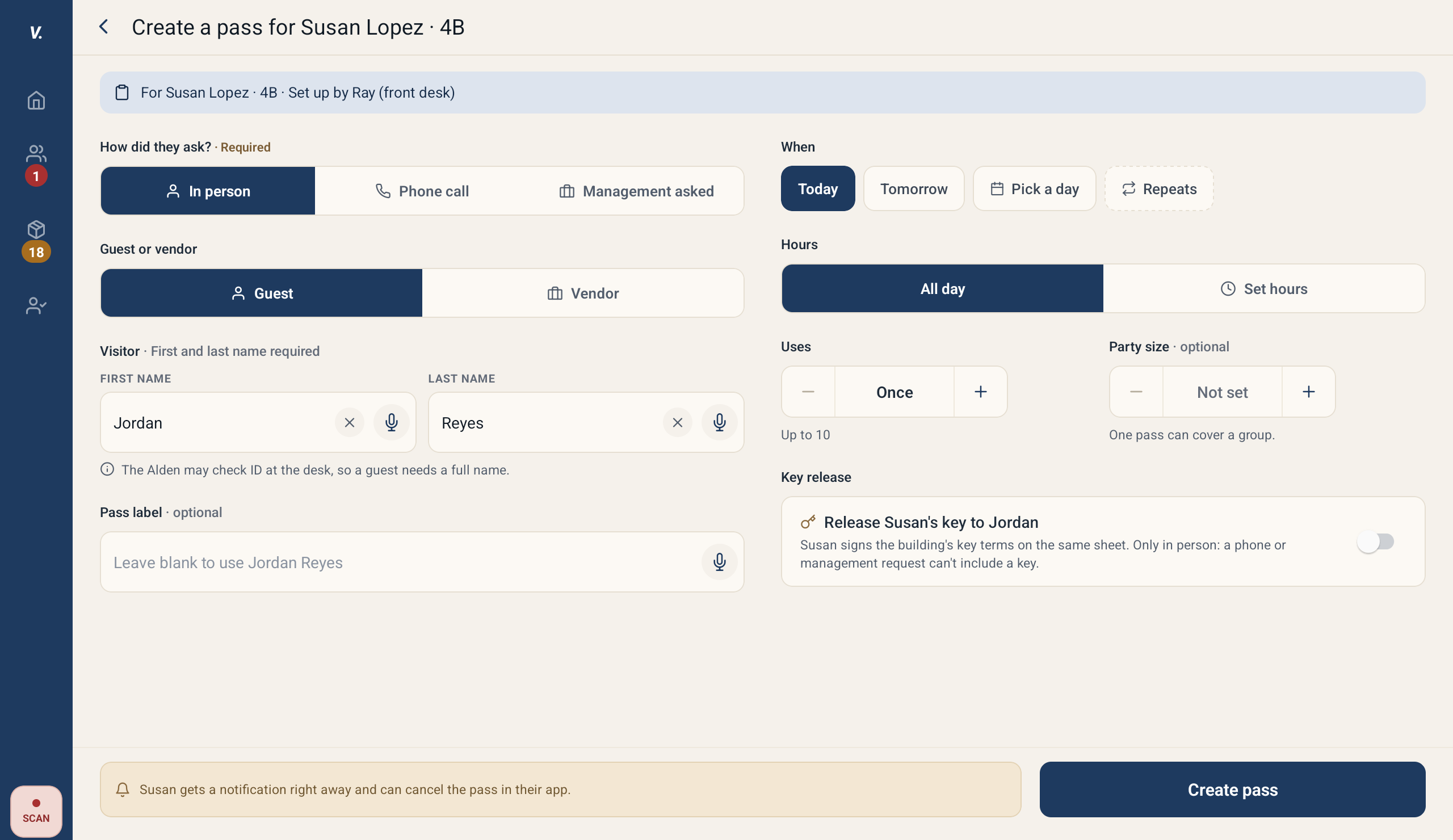 The Create pass form on the desk tablet
Repeating passes and keys need the resident at the desk
Two choices appear only when the resident asked In person, because the resident has to sign for them on the tablet:
- Repeats: a weekly pass for the days you pick under Every, between the From and To times, until a last day you choose.
- Key release, in a building with key exchange turned on: lets the desk hand the resident's unit key to the visitor. The resident signs the building's key terms on the same sheet. A phone call or a management request can never include a key.
When a signature is needed, the button reads Hand to Ana to sign (with the resident's first name).
- Hand the tablet to the resident. They read what they are signing to the end, tick I agree (I agree to both parts when it includes the key terms) and type their full name.
- Take the tablet back. Tick I checked this is Ana Ruiz (with the resident's name on the roster) and tap Save pass.
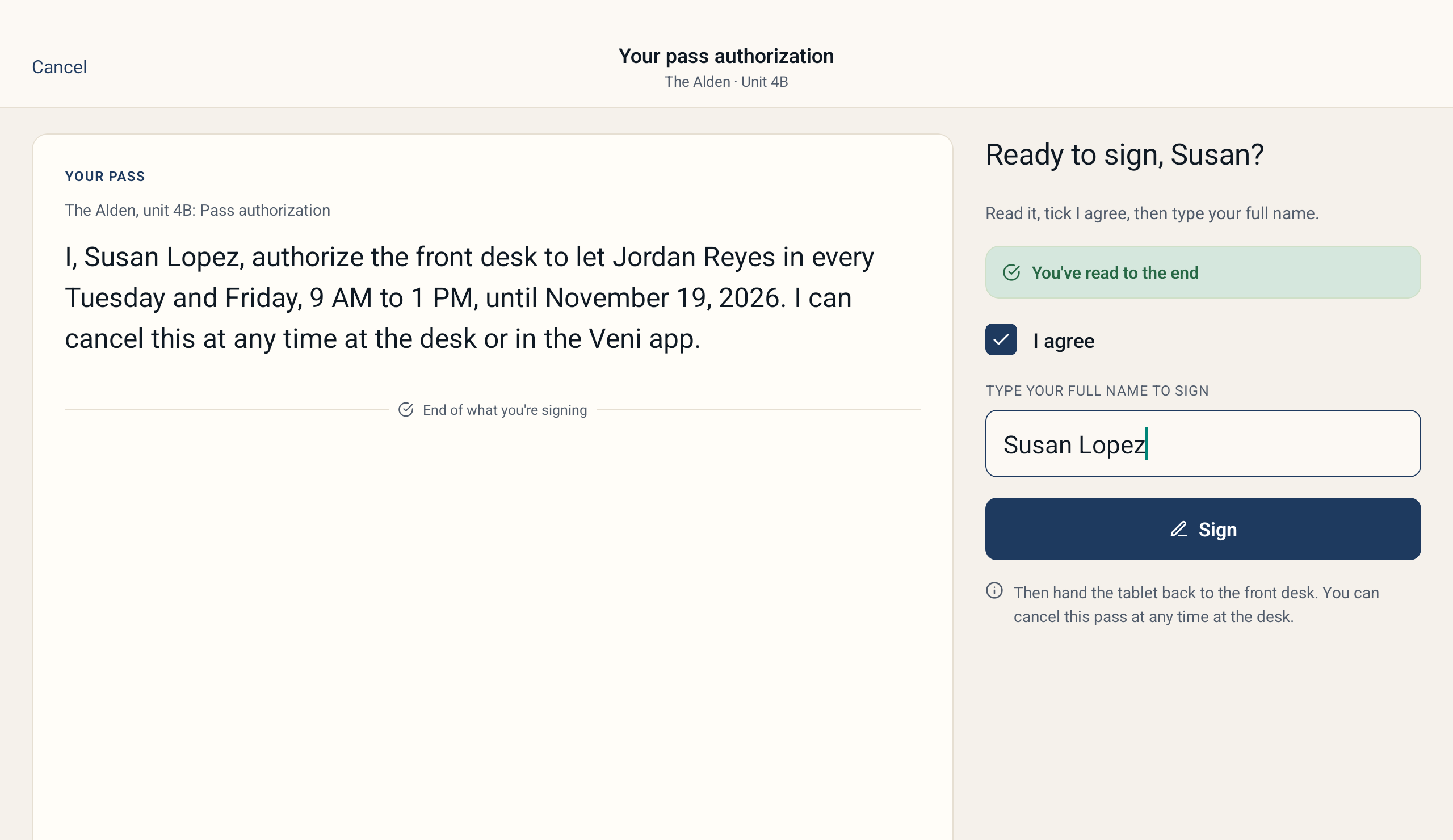 The resident signs on the tablet before the pass is saved
The desk never sees what the resident typed, only that they signed and when. If the signed name does not look like the roster name, the tablet warns you; you can still save once you have checked it is them.
When the visitor arrives
A desk pass works only at the front desk, never at a door, and there is no code to send the visitor. When they give their name, find them in Happening today (under EXPECTED TODAY before the pass starts, ACTIVE PASSES after), or search their name on Now, and approve them on the pass sheet as usual. The sheet says who set the pass up, such as "Set up in person at the desk by Ray" or "Set up by Ray from a phone call". For a pass the resident signed at the desk, Read what Ana signed opens what they signed, and each opening is recorded.
A resident's upcoming passes are listed under Upcoming passes on the All and Visitors tabs of their profile, each with who set it up.
Who is told
A resident on Veni gets a notification about the pass and can cancel it in the Veni app. A resident who is not on Veni is not told, so let them know in person. Management sees desk passes in the Guest Passes tab, marked as set up at the front desk, with how the resident asked.
Cancelling or changing a desk pass
Open the resident's Visitors tab and tap Cancel pass on the pass, then confirm. The desk can cancel only passes it set up; a pass from the Veni app or from management is cancelled by the resident or by management. If a key is still out on the pass, the tablet asks you to Mark key returned first.
To change a desk pass, cancel it and set up a new one.
More in Front desk