Reading the feed
The Activity tab shows a single reverse-chronological feed of everything that happened at a building, grouped under day headers ("Today," "Yesterday," then full dates). Each row opens a detail modal when clicked, showing the full record for that event.
Use the type chips above the feed to narrow what you see: All, Door entries, Guest passes, Keys, Calls, Packages, and Flagged. Each chip shows a live count next to its label, and a chip with zero matching events is disabled. Keys and Packages only appear on buildings running in front desk mode.
Filtering
The toolbar above the chips gives you:
- A free-text search box ("Search people, units, doors, notes...")
- A Person dropdown (residents and staff)
- A Unit dropdown
- A Door dropdown (front door plus any enabled secondary doors)
- A range segment: Today, 7d, 30d, or Custom (which reveals two date pickers)
Click Clear to reset every filter back to defaults in one step. If a search scans more than 500 events without narrowing enough, the feed notes "Searched the most recent 500 events" so you know the result may be partial.
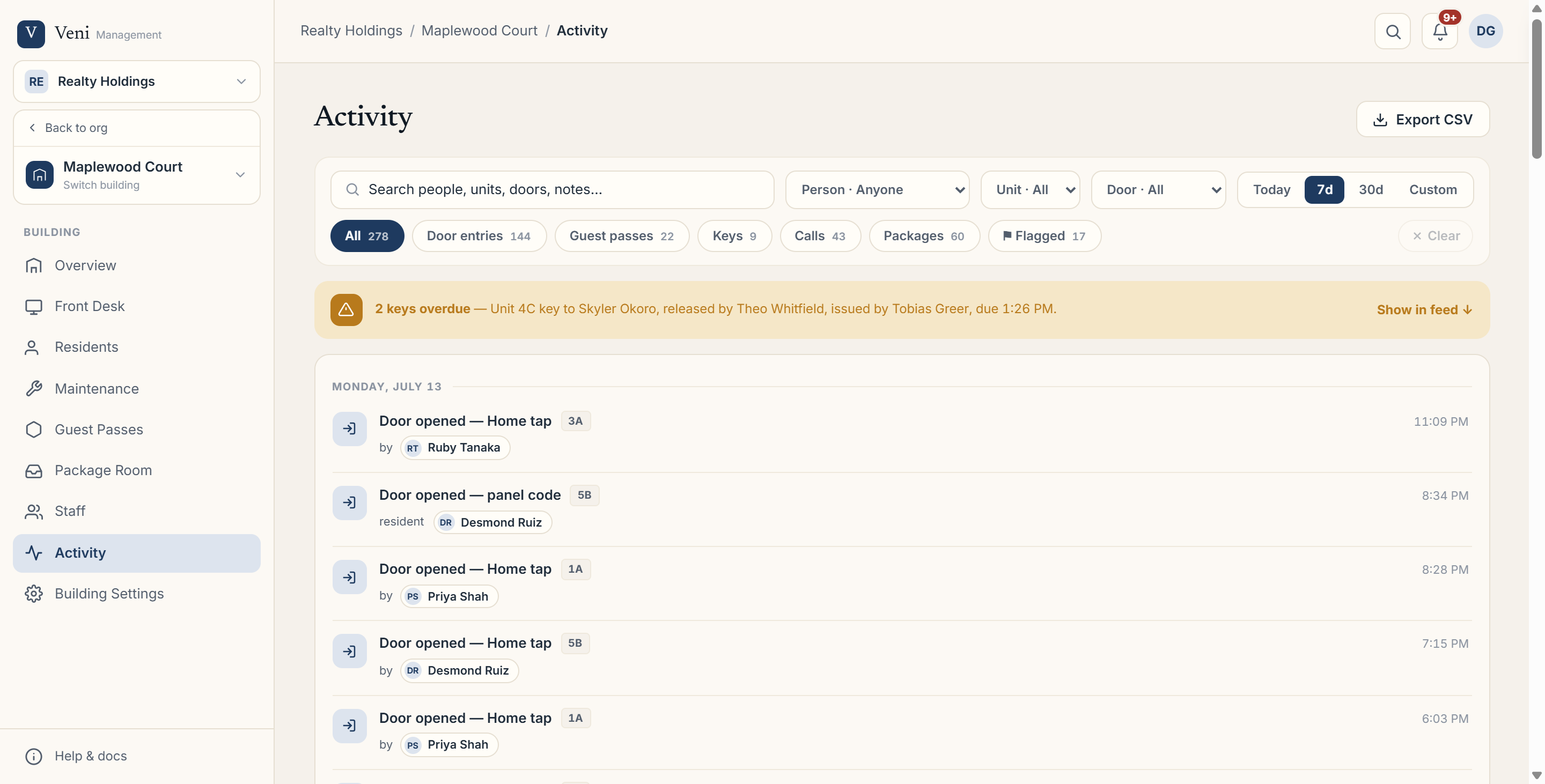 Activity tab showing the day-grouped feed with type chips and the filter toolbar above it
Attention strip, loading more, and export
When a key handoff is overdue, a warning strip appears above the feed naming the unit, guest, and who released or issued the key, with a Show in feed shortcut that jumps to the Flagged chip.
The feed loads 50 events at a time; click Load older activity at the bottom to fetch more. If you have manage access to Activity, an Export CSV button in the top right downloads the currently filtered results as a file.
De-identified and governance views
In an access mode that de-identifies activity, a notice banner explains that doors, methods, times, and flags are still shown, but resident and visitor identities, units, call summaries, and call stills are hidden (maintenance you are personally assigned still shows identity). In the strictest governance mode, the per-resident feed itself is hidden entirely and the tab shows a message that per-resident activity is private to residents, with trends and incident summaries available elsewhere instead.
More in Buildings
- Setting up a door and pairing an intercom panel2 min read
- Intercom mode vs front desk mode1 min read
- Adding and managing secondary doors1 min read
- Posting building announcements to residents1 min read
- Printing QR decals for the lobby and doors1 min read