A door in Veni represents a controllable entry point: a main lobby, garage gate, side entrance, or amenity room. Each door can be opened from the resident app, a guest pass QR scan, or the front desk, and can have its own intercom panel paired to it.
1. Create the door
- Open the building and go to the building's Doors tab.
- Choose + Add door.
- Give the door a clear name, for example,
Main LobbyorParking Garage. This name appears in the resident app and on the front desk screen. - Save. The door is now visible but has no relay or panel yet.
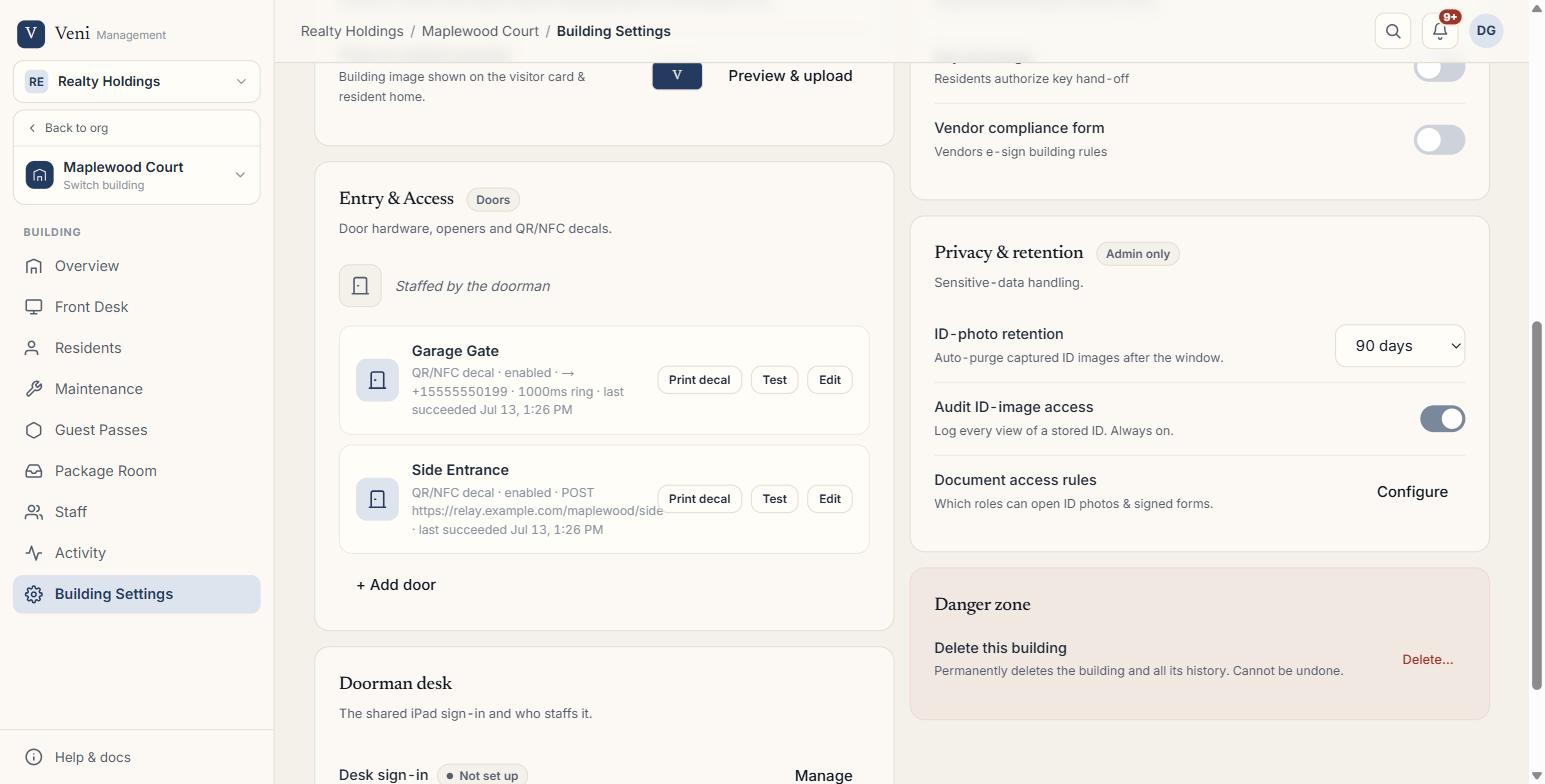 Setting up a door
2. Configure the relay (how the door actually opens)
Open the door's settings and add an opener. Two relay types are supported:
- Dial-to-open relay: the panel dials an E.164 phone number to trigger the relay. Enter the opener number and optionally set how long the ring pulses (in milliseconds).
- HTTP relay: the server sends a POST request to a public HTTPS endpoint when the door is opened. Optionally add an authorization header.
Use Test unlock to fire the relay once and confirm the door responds before residents rely on it.
3. Pair the intercom panel
- Power on the panel; it displays a 6-digit pairing code on screen.
- In the door's settings, choose Pair panel and enter that code.
- Once paired, place a test call from the panel to confirm video and audio are working.
4. Grant access
New doors start with no one able to open them. Assign the door to specific units or staff roles under People & Access so residents and the front desk see it in their app and on the desk screen.
Secondary (side) doors
In front-desk buildings, you can add secondary doors for unmanned entry points that residents reach via a QR or NFC sticker; no intercom panel required. These appear on the same Doors list and use the same relay types. Visitors scan the sticker to trigger a video call to the front desk; the front desk opens the door from the tablet.
Editing or removing a door
Rename, disable, or delete a door at any time from the Settings → Doors list. Disabling a door stops all opens (app, pass, and desk) without removing the configuration.
More in Buildings
- Intercom mode vs front desk mode1 min read
- Adding and managing secondary doors1 min read
- Posting building announcements to residents1 min read
- Printing QR decals for the lobby and doors1 min read
- Configuring a building's settings2 min read