The Package Room tab gives property managers a building-wide view of every package waiting for pickup; aging, carrier, location, and exceptions. Packages are logged at the front desk and appear here immediately.
How a package gets logged (front desk side)
On the front desk tablet, when a delivery arrives:
- Open the resident's record or search by name/unit.
- Tap Log package.
- Select chips to tag the package:
- Carrier: Amazon, UPS, FedEx, USPS, DHL, or custom.
- Size: Envelope, Small box, Large box, Multiple items, Oversized.
- Handling: Fragile, Perishable; keep cold, Heavy, Signature required.
- Held at: At desk, Storage room, Mailroom, Behind counter, Refrigerator.
- If a scanner is paired or a tracking number was already provided, optionally enter or confirm it. Veni stores the full number encrypted and shows only the last 4 digits on screen; the truncation is a display choice, not what's stored.
- Tap Log. A notification DM is sent to the resident automatically.
The resident sees the package in their Veni app under Your packages with the carrier, location, and any handling notes; without seeing internal staff attribution.
The Package Room tab (management portal)
Open a front-desk building and choose Package Room. The aging board lists every resident with packages waiting, sorted by the oldest unresolved delivery.
Each row shows:
- Resident name and unit.
- Number of packages waiting.
- Oldest package age (green = 0-2 days, yellow = 3-6 days, red = 7+ days with a flag).
- Carriers on file.
Expand a row to see individual packages with their tags, location, logged date, and who logged it.
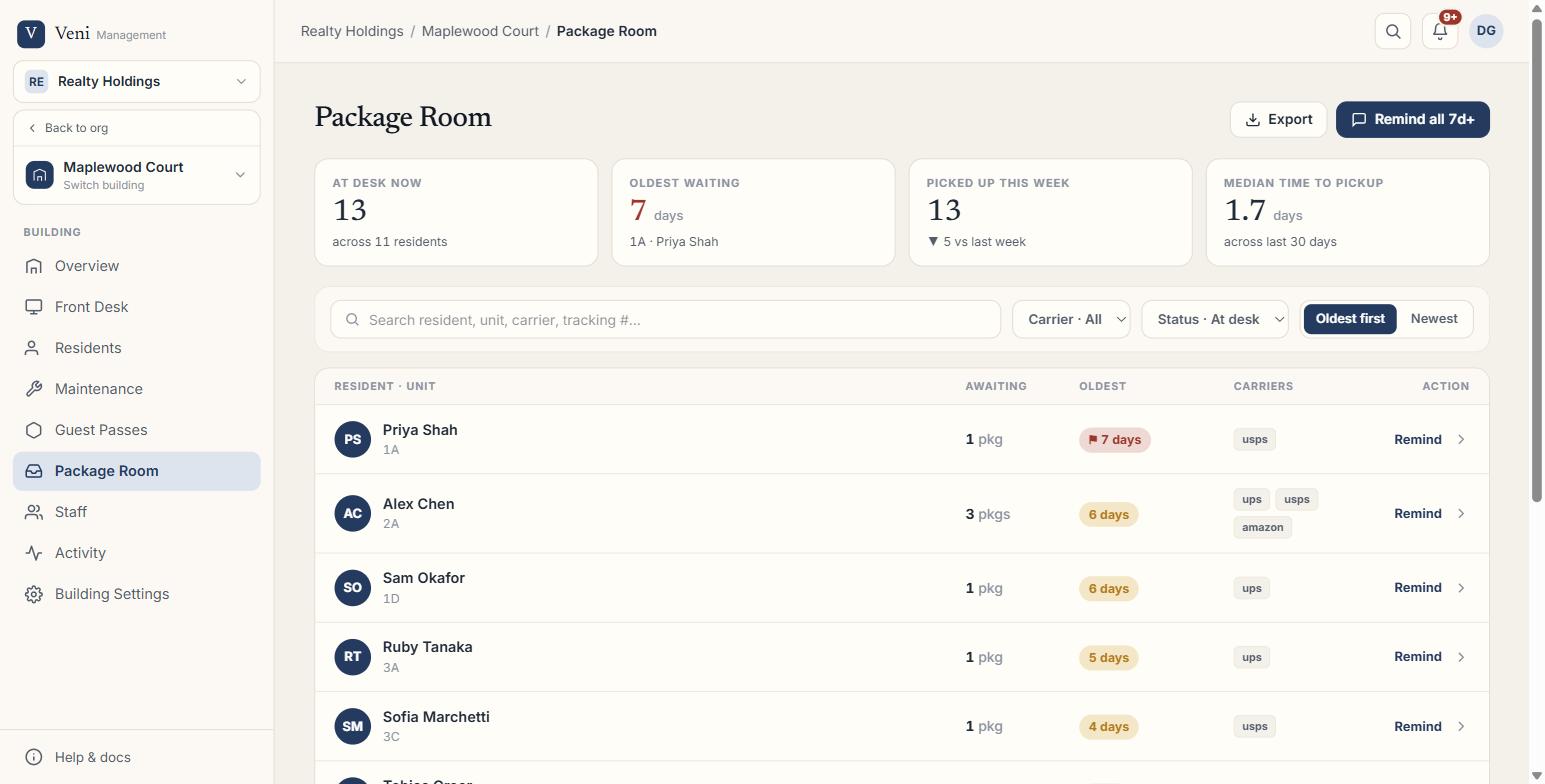 The Package Room tab
Sending reminders
To remind a resident about their package:
- Find the resident in the aging board.
- Click Remind on their row.
- Review or edit the reminder message, then send.
To remind all eligible residents in one action, click Remind all at the top of the Package Room tab. Only residents whose oldest waiting package is 7 days or older are included. Moved-out residents and residents who were notified recently are skipped automatically.
Marking a package picked up
On the front desk tablet, when a resident collects their delivery:
- Find the package in the resident's active packages.
- Tap Picked up.
The package moves to the resident's pickup history in the app and is removed from the aging board. The activity feed in the management portal records the pickup with the name of whoever handled it.
Exceptions
Two exception types are flagged in the Package Room view:
- Moved out: the resident associated with a waiting package no longer has an active tenancy. The package may need to be forwarded or returned.
- Duplicate: two or more packages for the same resident have the same tracking suffix. Confirm before logging additional deliveries.
Exceptions appear in a dedicated section at the bottom of the Package Room tab. Resolve them by clicking Review and taking the suggested action.
Exporting
Click Export CSV at the top of the Package Room tab to download a spreadsheet of all current waiting packages; resident name, unit, package count, oldest age in days, and carriers.
More in Packages
- Customizing package note tags1 min read
- Handling package exceptions: moved-out and duplicates1 min read
- Package Room metrics and exports2 min read
- Scanning packages on the go2 min read